
Homepage | Help | Toys | Codes
- Homepage | Help | Toys | Codes
- I didn’t get a Code with my toy. What do I do?
- How to unlock a book code
- If I don’t have a Club Penguin membership, can I still use my Code to unlock items?
- What does my Code unlock?
- Where can I get a Code?
- Where do I enter my Code?
- How do I unlock an item?
- When my membership expires, will I lose the items I unlocked?
- My Code doesn’t work. What now?
- Where do I enter my Code?
- How do I unlock a Toy Code?

I didn’t get a Code with my toy. What do I do?
Some Club Penguin toys and products do not have codes with them. Here is a list of all the merchandise that have codes you can use to unlock items online.
- 2″ Penguin Mix n Match Figures
- 6.5″ Limited Edition Penguins
- 9″ Limited Edition Penguins
- 4″ Puffles
- 5.5″ Puffles
- 10″ Jumbo Puffles
- 2″ Puffle Clip Ons
- All Vehicle & Playsets
- Air Hockey Set
- Trading Cards
- EPF Card Game
- Nintendo DS Games
- Wii Game
- Pin Sets
- Select Books
- USB
- Select Sporting Goods
If you have one of the above toys but do not have a code with it, please contact our Community Support team and they will be happy to assist you.
How to unlock a book code
Go to play.clubpenguin.com/#/redeem. Login with your penguin name and password. If you don’t already have a penguin, first create a free account.

If you have a book, first click on the “I’ve got a Book” tab, and find the code word by following the directions given in the question. Be sure to enter the word exactly as it appears in the book.
Enter the word correctly, and you’ll receive a special book item for your penguin and some coins.
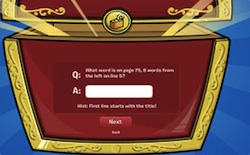
You can only have one book item – any further book codes you enter will give you coins.
Treasure Book items work for both members and free accounts. If you have a code that doesn’t work, or experience any other difficulties, please contact Club Penguin Community Support.
If I don’t have a Club Penguin membership, can I still use my Code to unlock items?
Absolutely! Everyone can unlock items online – all you need is your penguin account and your toy code.
What does my Code unlock?
Codes can unlock lots of rare items in Club Penguin. From clothes to accessories, they can also unlock exclusive items, secret rooms, puffles, special features and abilities in games.
Books will unlock a unique item and coins you can use in Club Penguin.
If you have a Toy Code, it will unlock access to the Treasure Book where you can choose from the BIGGEST selection of items that you can use in Club Penguin. It’s packed with long-time favorites, and never-before seen exclusive items.
If you have purchased Club Penguin Trading Cards, you can unlock additional cards and powers that will enhance your game play and put you on the fast path to becoming a ninja.
Where can I get a Code?
Codes are found with various Club Penguin toys and books. Look for the icon with a lock when you purchase a toy or a book. Then go to Club Penguin to find out what sort of treasure you’ve unlocked. Some toys come with a special coin that has a code on it. Keep this coin safe and use it when you’re ready to unlock your items.
Where do I enter my Code?
Go to http://play.clubpenguin.com/#/redeem. Login with your penguin name and password, then follow the instructions. Or if you don’t already have a penguin, first create a free account. If you need additional help, check out the How To Unlock Items page.
How do I unlock an item?

- When you see an image with a lock you know your Club Penguin toy or product has a code that will unlock items online. Make sure to keep the code safe – it can only be used once, so don’t lose it!
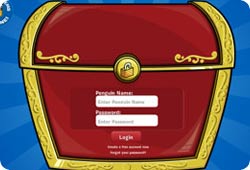
- Go to play.clubpenguin.com/#/redeem. Login with your penguin name and password. If you don’t already have a penguin, first create a free account.
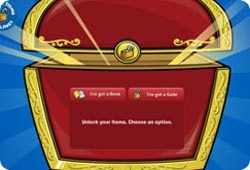
- If you have a toy, click on the “I’ve got a Code” tab, then enter your toy code and click the ‘Next’ button. Make sure you enter the code exactly as it appears
- Enter your toy code and click the ‘Next’ button. Make sure you enter the code exactly as it appears.
- If you have a book, first click on the “I’ve got a Book” tab, and find the code word by following the directions given in the question. Be sure to enter the word exactly as it appears in the book.
- Enter the word correctly, and you’ll receive a special book item for your penguin and some coins.
- Treasure Book items work for both members and free accounts. If you have a code that doesn’t work, or experience any other difficulties, please contact Club Penguin Community Support.
When my membership expires, will I lose the items I unlocked?
Items you unlock with a code or book will ALWAYS be accessible, whether you have a membership or not.
My Code doesn’t work. What now?
Check to make sure you have entered your code exactly as it appears on your special coin. Or, if it’s a word from a book, be sure you’ve typed it exactly as it appears. If you enter the wrong code five times, you’ll have to wait to try again. If you continue to have difficulties, please contact Support.
Where do I enter my Code?
Go to http://play.clubpenguin.com/#/redeem. Login with your penguin name and password, then follow the instructions. Or if you don’t already have a penguin, first create a free account. If you need additional help, check out the How To Unlock Items page.
How do I unlock a Toy Code?
When you see the lock icon, you know your Club Penguin toy or product has a code that will unlock items online. Make sure to keep the code safe – it can only be used once, so don’t lose it!
Go to play.clubpenguin.com/#/redeem. Login with your penguin name and password. If you don’t already have a penguin, first create a free account.

If you unlock a puffle code, you’ll be asked to give your pet a name! If you already have the maximum 20 puffles, you’ll receive a bonus item instead.
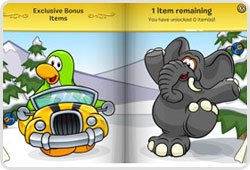
If your code unlocks a special item that you already have the maximum of, you’ll receive a bonus item instead.
To learn how to choose your items, click ‘Choosing your Treasure Book items’.
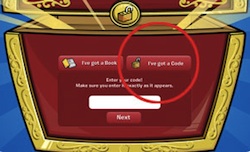
If you have a toy, click on the “I’ve got a Code” tab, then enter your toy code and click the ‘Next’ button. Make sure you enter the code exactly as it appears.
Enter your code correctly, and you’ll gain access to the Treasure Book!



 That Penguin Game
Leave us a comment below!