
Homepage | Help | Technical Help | Connection Topics

What does multiple connections mean?
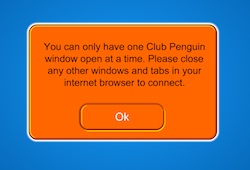
Only one penguin account can be logged on one computer at a time. If you get a error message that says you have multiple connections it means Club Penguin is running on two different browser windows or tabs.
Try closing any extra open windows that are running Club Penguin and you should be able to log on.
How fast should my internet connection be?
Club Penguin will work with a 56 K modem or higher, however a broadband connection is recommended. You’ll have a quicker connection to Club Penguin if you use:
- A modem with a speed of 2MB per second with your dial-up connection
- A DSL connection
- A cable connection
- A fiber-optic connection
What kind of computer should I be using?
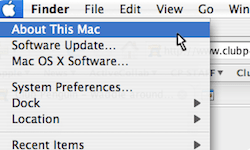
If you use a Mac, we recommend:
Processor: Intel Core™ Duo 1.33GHz or faster processor
Operating System: Mac OS X v10.6 or v10.7
Web Browser: Safari 5.0 and above, Mozilla Firefox 4.0 and above, Google Chrome
System/Graphics Memory: 1GB of RAM; at least 128MB of available graphics memory
Flash Player: To play Club Penguin you’ll need Flash Player installed. You should also check that your Flash Player is always up to date. Download it for free by visiting the Adobe Flash Player website.
Connection: A wired broadband connection is recommended for playing games online. You can use a wireless connection, or a 56K modem, but sometimes the game may run a bit slower.

If you use Linux, we recommend:
Processor: 2.33GHz or faster x86-compatible processor, or Intel® Atom™ 1.6GHz or faster processor for netbooks
Operating System: Red Hat® Enterprise Linux (RHEL) 5.6 or later (32-bit and 64-bit), openSUSE® 11.3 or later (32-bit and 64-bit), Ubuntu 10.04 or later(32-bit and 64-bit)
Web Browser: Mozilla Firefox 4.0 or Google Chrome
System/Graphics Memory: 1GB of RAM; at least 128MB of available graphics memory
Flash Player: To play Club Penguin you’ll need Flash Player installed. You should also check that your Flash Player is always up to date. Download it for free by visiting the Adobe Flash Player website.
Connection: A wired broadband connection is recommended for playing games online. You can use a wireless connection, or a 56K modem, but sometimes the game may run a bit slower.
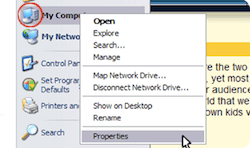
If you have a PC, we recommend:
Processor: 2.33GHz or faster x86-compatible processor, or Intel® Atom™ 1.6GHz or faster processor for netbooks
Operating System: Microsoft® Windows® XP (32-bit), Windows Server® 2003 (32-bit), Windows Server 2008 (32-bit), Windows Vista® (32-bit), Windows 7 (32-bit and 64-bit)
Web Browser: Internet Explorer 7.0 and above, Mozilla Firefox 4.0 and above, Google Chrome, Safari 5.0 and above
System/Graphics Memory: 1GB of RAM; at least 128MB of available graphics memory
Flash Player: To play Club Penguin you’ll need Flash Player installed. You should also check that your Flash Player is always up to date. Download it for free by visiting the Adobe Flash Player website.
Connection: A wired broadband connection is recommended for playing games online. You can use a wireless connection, or a 56K modem, but sometimes the game may run a bit slower.
Why can’t I connect to the server?
There’s a few reasons you may not be able to connect to a server in Club Penguin:
- You might need to clear your cache. Please go to How do I clear my cache? to find out how. You may want to try this first.
- Check you are using the latest version of Adobe Flash Player. Your Flash Player is the part of your computer that lets you play Club Penguin. You might need to install the newest version. The best way to do that is to go to the Flash Player Download Center.
- This might be a problem on Club Penguin’s end, not yours. The server might be offline so that Club Penguin can update or work on the website. Try going to the What’s New Blog. You can find important news there about what’s happening on the site.
- Your computer might have a firewall built into it. Programs such as Window XP, Vista, and Mac OSX have a firewall that might prevent you from logging on to Club Penguin. Talk to an adult about how to change the settings on your firewall.
What do I do if I’m having username or password errors?

If you’re unable to login, first check that your caps lock or ‘A’ light on your keyboard is not on. If it is on, then press the caps lock key and try again.
If this doesn’t fix your problem you may want to create a new password.
If this doesn’t fix your problem you may have a slow connection.
Please see the lost connection help for more information.
Why did I lose my connection to Club Penguin?
There are several reasons you may have lost connection from Club Penguin. Here are a few things you can try.
Be sure to ask a parent or trusted adult for help.
- You might have problems because your wireless connection is poor. Try connecting your computer to the internet with a cable.
- Check the Blog for updates. We’ll let you know if there are problems with the site.
- Try logging on later. Club Penguin sometimes has to go offline so the team can update the site.
- Try logging in again and selecting a different server. The server you were logging into might be too full.
- Never share your password with anyone, except your parents. If someone else logs on with your penguin at the same time as you, you will lose your connection.
- Check out the Why is my connection slow? page for tips.
If you’ve tried absolutely everything, and you’re still having problems, please contact Club Penguin’s Player Support Team.
Why is my connection slow?
There are two main reasons why it might take a long time when you’re trying to connect to Club Penguin:
Reason 1:
The type of internet connection you have might be slow. There are three main ways to connect to the internet: dial-up, cable, and DSL. Dial-up connection, which uses your telephone line is the slowest way to connect. So if you use this, you might find that it’s always slow to connect to Club Penguin.
Here are some tips to make sure you get the fastest connection possible:
- Use the fastest modem you can. You’ll want a modem that sends and receives information at 56 K per second. A modem with 2 MB per second is even better.
- Make sure there are no problems with your telephone line. Sometimes an old phone line picks up stray signals from other phone lines and will interfere with your connection. Your telephone service provider can tell you if there’s a problem.
Reason 2:
These things might slow down your connection:
- Make sure you’re not running other programs while playing Club Penguin. If you were visiting another website, make sure you exit out of it. Don’t try to play while you’re downloading music or videos. This can slow down your connection to the internet.
- You might have more programs on your computer than it can handle. Even if all programs aren’t running, they can slow things down. Talk to an adult about deleting programs you never use. This will give your hard drive more space.
- Your computer might not have enough memory. Try the solutions in #1 & 2 first. If this doesn’t help, have a parent or guardian check if your computer meets our minimum requirements.
- Your computer might be infected by spyware. There are programs you can use to check for spyware on your computer and get rid of it.
- Your computer might be infected by a virus. There are programs you can use to check for viruses on your computer and delete them.





 That Penguin Game
Leave us a comment below!