
Homepage | Help | Safety | Chat Modes

Ultimate Safe Chat
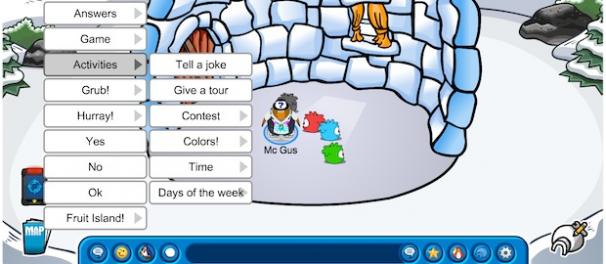
Players with accounts set to Ultimate Safe Chat mode can communicate using the predefined menu of phrases, emotes, actions and greeting cards. They cannot type their own messages. These players can only see other Ultimate Safe Chat messages.
There are dedicated Ultimate Safe Chat servers in Club Penguin. To choose one of these servers, look for the speech bubble icon when selecting a server.
Standard Safe Chat
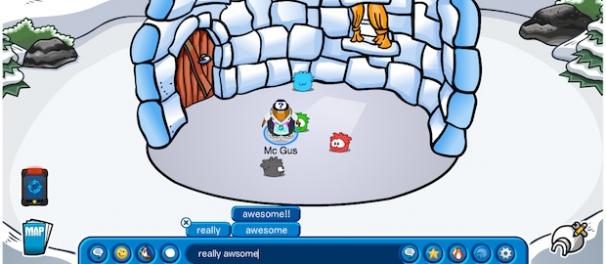
Standard Safe Chat allows players to type their own messages. As you type in the chat bar, word suggestions will appear above the bar. If you see the word you’re looking for, select it. You can continue typing, and selecting word suggestions until your message is complete. If the word you want does not show up, you can type your own.
All messages go through a sophisticated filter which blocks inappropriate words and phrases before it can be viewed by other players. Although the filter is continuously updated, comments that could be offensive to some players may occasionally get through. To further protect the security of Standard Safe Chat participants, moderators monitor what’s going on and receive player reports of misconduct.




 That Penguin Game
Leave us a comment below!