
Homepage | Help | Game Help | Friends

- Homepage | Help | Game Help | Friends
- How do I add a famous penguin to my Friends list?
- How do I find out more about other penguins?
- How do I create ‘Best Friends’?
- How do I ignore other players?
- How do I send mail to my friends?
- Can I search for friends in my Friends list?
- How do I see which penguins I have ignored?
- I’m new to Club Penguin. How do I make friends?
- How do I remove a penguin from my Friends list?
- How do I ask someone to be my friend?
- How many friends can I add to my list?
- How do I accept friend requests?

How do I add a famous penguin to my Friends list?
Everyone wants to be friends with someone famous!

- When you meet a famous penguin at an event or party, click on them to bring up their player card and click the orange penguin icon.
- To add a famous penguin to your Friends list you’ll have to meet them in-game first.
How do I find out more about other penguins?
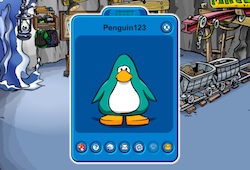
Every penguin has a Player Card. Use the icons on the bottom of their card to learn more about them!
- Click on another penguin to open their Player Card.
- Send a friend request by clicking the Friends icon. When your request is accepted, the penguin will be added to your Friends list.
- To find out which room a friend is in when they’re online, click the question mark.
- Visit your friend’s igloo by clicking their igloo icon.
- Send someone a postcard by clicking the envelope icon.
- Check out a penguin’s Stamp Book by clicking on the stamp icon.
- If another penguin is breaking the Club Penguin Rules, report them to a moderator by clicking the moderator icon.
- If another penguin is being mean to you, you can ignore that player by clicking the ghost icon on their Player Card. You’ll no longer be able to see them, or anything they type.
How do I create ‘Best Friends’?
It’s easy to keep track of your favorite penguin friends.
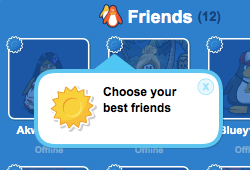
- Open your Friends list and click the round icon next to your friend to make them a Best Friend
- When you have added ten or more friends to your list, you can mark your favorites as ‘Best Friends’
How do I ignore other players?
All penguins should feel safe and have fun. So if you want, you can ignore other penguins. This will block that player from your view and block any messages or emotes that player sends.

- Then click the ghost icon on their player card.
- Click on the penguin you want to ignore.
How do I send mail to my friends?

Use Penguin Mail to send postcards to your friends. Everyone loves getting mail!
If you want to send mail, click the envelope icon at the top left of your screen.
- To send a postcard, open the postcard catalog, select a friend and the postcard you want to send
- Preview the postcard and then click ‘yes’ to send
- Postcards cost 10 coins each
Can I search for friends in my Friends list?
Yes! Searching for friends is easier than playing Hide & Seek, and a whole lot quicker.
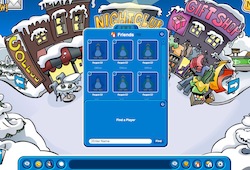
- Start typing their penguin name in the white bar at the bottom of your Friends list
- If your friend is already on your list they will appear when you begin typing
- If you want to search for a new friend, type their full penguin name and select ‘Find’
How do I see which penguins I have ignored?
Not sure if you’ve accidentally ignored a friend? Or want to take someone off your ignore list?
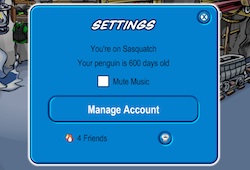
- To view your Ignore List, click on the gear icon in your toolbar
- Then select the icon of a ghost
- If you want to take a penguin off your Ignore List, click on their penguin name
I’m new to Club Penguin. How do I make friends?

The best way to make friends is to get involved and be kind to others. It’s easy to communicate with others using chat and emotes.
- Waddle up to someone and say hello or smile and see what happens
- Ask another penguin to play a game of Sled Racing or Find Four
- Invite other penguins to an igloo party
- Become a Tour Guide and show new penguins around the island
How do I remove a penguin from my Friends list?
You can remove penguins from your Friends list.
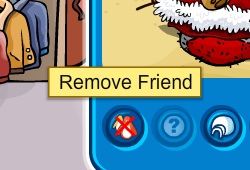
- Click on them in your Friends list to open up their player card
- Then click the crossed out penguin icon to remove them from your Friends list
How do I ask someone to be my friend?
Sending another penguin a friend request is easy!
- Click on them and select the orange penguin icon
- Or click an empty slot in your Friends list
- Or if you have more than 10 friends, click the white bar at the bottom of your Friends list
- Type in their name exactly as it is and click ‘Find’
- If they accept your request you’ll get a notification
How many friends can I add to my list?

You can add up to 500 friends! Now that’s a lot of penguins!
How do I accept friend requests?
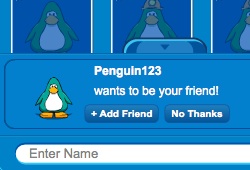
- To accept a friend request select the notification that pops up at the bottom of your screen.
- Or open your Friends list and select the notification tab to see all your friend requests
- Select the ‘Accept’ button





 That Penguin Game
Leave us a comment below!